Before You Start
You'll need the following in order to begin using Woodforest Mobile Deposit on your mobile device:
- If using an iPhone®, you will need iOS 15.0+
- The current version of the Woodforest Mobile Banking App
- Second-Factor Authentication set up
- Enrolled in Woodforest Online Services
- An eligible Woodforest checking or savings account
Steps to Make A Mobile Deposit
Step 1: Preparing your check for Mobile Deposit
-
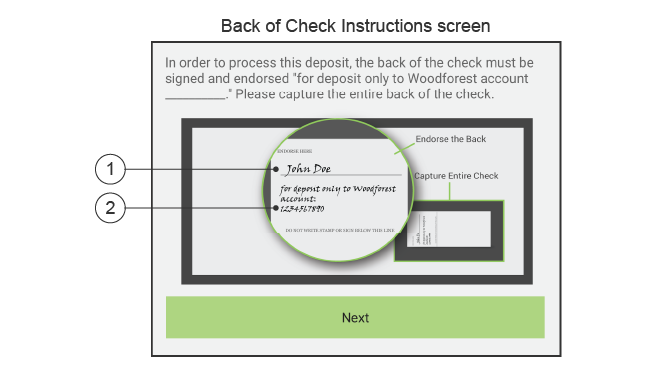
- Sign the back of your check in the endorsement section.
- Underneath your signature and within the endorsement section, write "For deposit only in Woodforest Account _______", entering your account number.
Step 2: Accessing Mobile Deposit
-
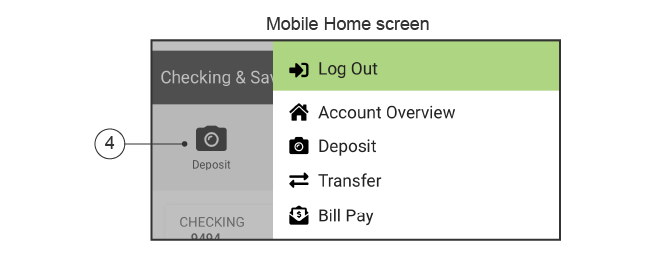
- Log into the Woodforest Mobile Banking App on your mobile device.
- You can access Woodforest Mobile Deposit either by selecting the Deposit icon from the menu displayed on the home screen or from the slide out navigation list.
Step 3: Making a Mobile Deposit
-
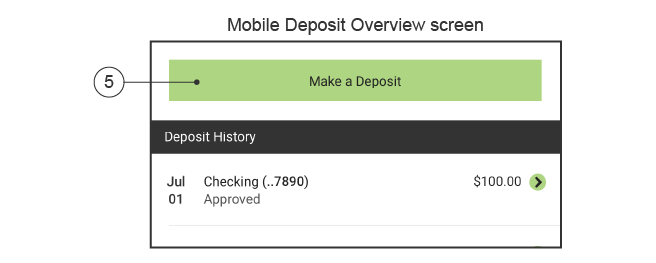
- From the Mobile Deposit Overview screen, select Make a Deposit. The Deposit Check screen displays.
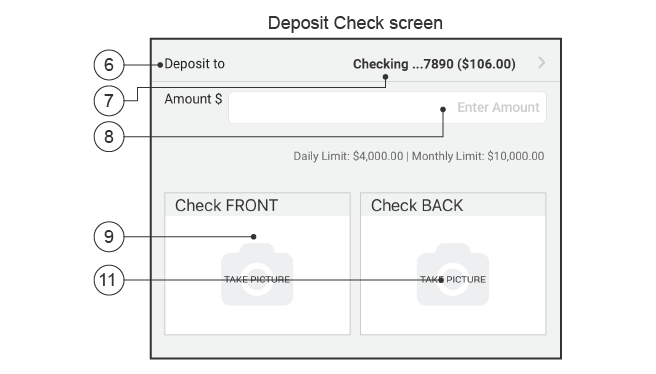
Note: The first time you use Mobile Deposit you will be required to agree to the terms and conditions. After reviewing, select Accept if you agree or Cancel if you do not agree and do not wish to use Mobile Deposit at this time. - Select Deposit to.
- Scroll down through the accounts displayed and select the account into which you wish to deposit the check. The account you selected displays in the Deposit to field on the Deposit Check screen.
Note: Your daily and monthly limits for the selected account display below the Enter Amount field. - Select Enter Amount field and enter the amount of the check.
- From the Mobile Deposit Overview screen, select Make a Deposit. The Deposit Check screen displays.
You are now ready to take pictures of your check!
Step 4: Taking a Picture of Your Deposit
-
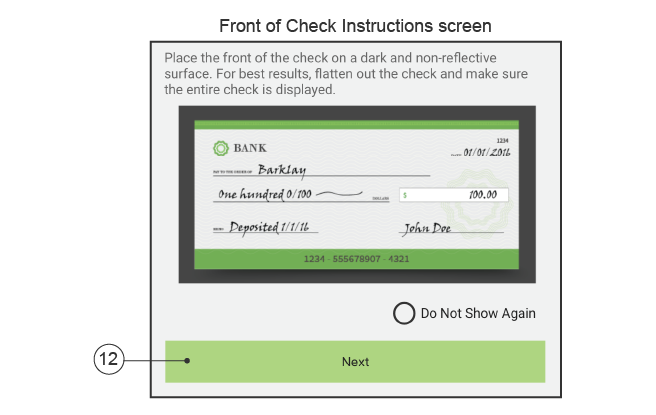
- Select Check FRONT to capture an image of the front of your check.
- Your mobile device camera opens. Take a picture of the front of your check. For best results:
- Place the front of the check on a dark and non-reflective surface.
- Flatten out the check and make sure the entire check is displayed in the camera box.
- Landscape may work best to take the picture.
- Select Check BACK to capture an image of the back of your check following the guidelines above. Be sure you have signed your check and write "for deposit only in Woodforest account _______", entering your account number. Refer to Step 1 “Preparing your check for Mobile Deposit” if you need additional guidance.
Important: Ensure you take a picture of the entire back of the check, not just the top, endorsed section. If you submit a deposit with only a partial image of the check, the system will automatically reject the check. Refer to “Back of Check Instructions Screen” above for more guidance.
Step 5: Submitting Your Deposit
-
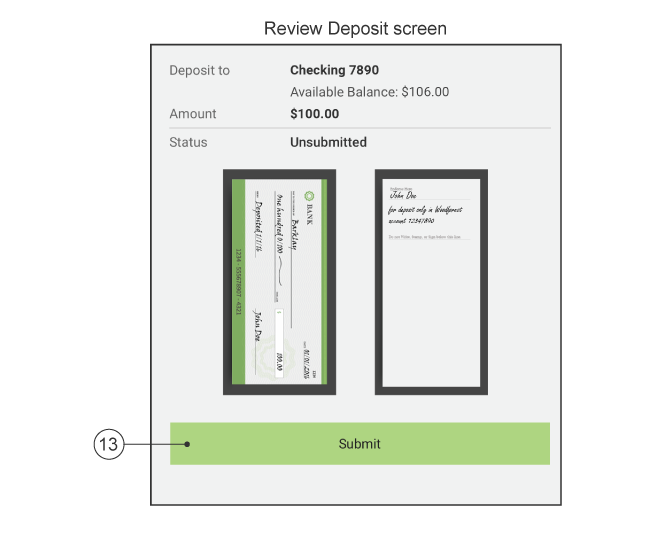
- Once you have taken a clear image of the front and back of the check, select Next to verify your deposit information is correct.
- Select Submit to send your document for processing. The notification banner message "SUBMITTED" will display once the deposit has been successfully submitted.
You will receive a Mobile Deposit Received Alert email, confirming your deposit has been received, and another email once it has been approved.


Additional Personal Banking Benefits
Online & Mobile Banking
Access your account whenever and wherever with Online & Mobile Banking.(1)
Debit Cards
Use your debit card to get cash at ATMs, make purchases, pay with digital wallets, and more.
Overdraft Services
We offer services to help protect you from accidental overdraft fees.
(1) Data rates may apply. See carrier for details.

DISCLOSURE
DISCLOSURE
(1) Data rates may apply. See carrier for details.